Automation and Go daddy’s web builder

Automation and Go daddy’s web builder

Few months back I shared an article on my Linked in Feed about Googles’s Alpha code A.I. Which was given the task to numerous code challenges and it wrote the solution code on it’s own. I headlined it with ‘next Sky net goes live’ 😁. But in all honesty it is generally the case for web development. To date I have set up five businesses with websites using web builders provided by domain providers and left them to manage their own web sites. It is as easy as  altering a Google doc, the businesses require no prior coding experience.

My recent endeavour was a client from the automotive industry. The owner runs a SME which assists folks with Vehicle Key replacement services as well all things dashboard related. The owner approached me with a fair idea of what he was after. The brief was as follows, “I have a business listed on Google, I am ranked 8th in my local vicinity when a google search is made in my area for Vehicle Locksmith needs, I have over 150 reviews on Google, to date I have used all the free tools at my disposal, to keep my operation online for free with no incurring fees (i.e. he had a domain which used .business as a suffix and used google forms for online quotations queries), But now I would like to commence investing in a decent domain and pay for SEO services.”

Brief given, I figured the best solution for this case would be to use Go daddy’s web builder. I proposed that we purchase BUSINESSNAME.com domain from goDaddy and pay the recurring fee of £5 p/m to connect it with a website created using the Go daddy web builder. Which we did.

Here are a list of task that were helpful to the business, that required me to do no coding but come as standard in the web builder by Go daddy:

  • The landing page with all the CSS well taken care of, i.e. the Nav bar, Hero Image, Footer, soft scroll, social media icons, hover chat bot and same themed colour scheme & text.
  • The WhatsApp button that I could add just by flick of a switch, which allowed customers immediately (on press) to connect with the business over WhatsApp.
  • The connect to business google reviews feature which display onto the website all the genuine customer reviews (and updated by themselves). Save me having to type them in manually on site. Just required some Auth logins to set up.
  • The scheduling a service feature, which allowed me to offer the business services to clients, just like a doctors appointment. That the clients could book and reschedule online.
  • In the marketing kit the SEO keyword feature, which runs a search similar to SEMRUSH of the necessary keywords that ought to be included into the content to better the sites changes on google SEO. It scanned the website and came back with text suggestions. It also suggested where to place these key words.
  • The easy connect to Social media handles feature.
  • The themes and the pre made CSS elements on offer. Which I could simply drag and drop onto the website.
  • The FAQ element, which can be updated by entering values in a form.
  • The automated verification of a Domain on Google Search Console via the ‘Domain name Provider’ method. Just required some Auth logins to set up.

All these things came about thanks to careful consideration of Developers (that built the website builder at Go daddy) of what a business that is starting out in the World Wide Web in the year 2022 may need. I should mention that I could always alter the code of the page by accessing it in the web builder should the need arise, like to embed google analytic code or Facebook’s Conversions API. In case all else fails, I can easily call Go daddy 24/7 to resolve issues.

Mo! Out!

Location Tags and Valet Parking

Location Tags and Valet Parking

Location tag

It is high time I feel I accepted that I have not much left to contribute, regarding web development. I believe I have shared whatever I had learned around this science.

This may very well be my last blog post, and of course the Podcast.

Right, sob story out of the way, onto the subject of today’s blog.

Location tags, for those who aren’t aware Apple, Samsung and Tile all offer up products that allow users to track their possessions. All of the products lean on phones and devices in close proximity to trigger bluetooth location of the tags. 

Over the last week I have seen my fair share of product reviews, comparisons and walk-through videos to learn about all the options available. Gone are the days of whistle key fob, now we have Gps tags, RFID tags, Sim Tags and Bluetooth tags.

I do not wish to elaborate on each, suffice to say that Vodafone and likes require users to pay towards a rolling contract (£2-3 per month) for devices using a sim, which can put off some people. 

Back to air tag, Samsung tag and Tile. These use bluetooth and devices proximity to locate tag location. So if you got a cat and it goes off to the woods with plenty of foliage, all three of them fail straight away, as no mobile devices are likely to be present to activate the tag. In this case a sim based device is required, which can generate it’s own signal. The cat owner can see gps logs of their pet as well as real time location. 

The software pose new challenges. As a stalker could plant the tag on someone and pose a serous threat to someone’s wellbeing, on the other hand someone could be on public transport and their cohabiting the space with a stranger can register in the same as the former.

The solution is not straight forward and surprisingly the likes of apple are struggling to solve such issues.

Moving onto second part of the blog, which is Valet parking. Why? You ask, because it will use location tags (as you will see). 

Let’s commence with definition of Valet Parking – it is a service provided near airports and restaurants, to allow vehicle owners to alight at the entrance to said locations, and a allocated driver will park the vehicle in the car park on behalf of the driver. 

In the field of valet parking, I have found very little in terms of web solutions to manage keys and keep on top of parked location of vehicles. 

I would think it would be more than paper raffle ticket books and a key safe. 

Therefore if I was ever tasked at meeting this challenge with web technologies and their capabilities, it may look something like so.

Vehicle is received by front desk, the manager receives the key and places an apple air tag in the key chain, and a further one air tag inside the vehicle, allowing for keeping on track of both. The vehicle owner’s mobile is noted and are sent a text with a link to click when they are ready to receive the vehicle. 

The allocated driver parks the car in the car park. The app has machine learning in place for few months, after which driver allocation and specific parking space allocation is handed over to A.I.

The entire operation requiring 1 or 2 drivers and nothing more, as controller’s or front desk role is obsolete, as the key drop could employ NFC tags and an automated key vault.

That’s it. 

Mo ! Out!

Ads – how far we’ve come

Whether it’s that dreading skip ad button on YouTube video we like to watch or the interrupting ads on our social media we’ve come to accept them. 

Types of ads

We’ve certainly come a long way from the captive audience during the televised era.

So, what’s all this happen to do with dev. Well, it has a lot to do with it, as most ads are sent our way through an online medium. Be it in the middle of a free game we downloaded or pop up tabs on our browser.

Today I wanted to breakdown the many ways devs have resorted to embed ads.

Let’s start 

  1. The z index, developers place invisible elements before the elements the user wants to click on, this invisible element tricks the the user to click on itself and triggers an event ’on click’ usually ‘open link in new tab’. These invisible elements are removed, allowing the user to click on the intended element. These are often placed on timed re appearance usually around two minutes or so. A good use case for this is on a video playing page, where the user may want to toggle the player controls such as volume, pause, skip 10 seconds and so forth.
  2. Banners. I know, I know, you are probably thinking we are not living in nineties, but believe it or not YouTube still uses banners on both above videos and above recommended next video list. So does WordPress, yes if this very blog post was to be viewed on a browser will be broken up with advertising banners. More on why this is later. 

Returning to the sub heading ‘banners’. They are usually filled by some API provider of ads, a common one being ‘Google ads’. Gone are the days when developer had to manually code in a specific gif banner, which could only can be changed by revisiting the code. Kinda like the old billboards vs the new digital ones. 

The con with these API banners is that they can be clicked on by bot instead of organic traffic draining the advertiser’s budget without much ROI. So now the tech world has created ‘bot blockers’ which come with added premium.

  1. In video ads 
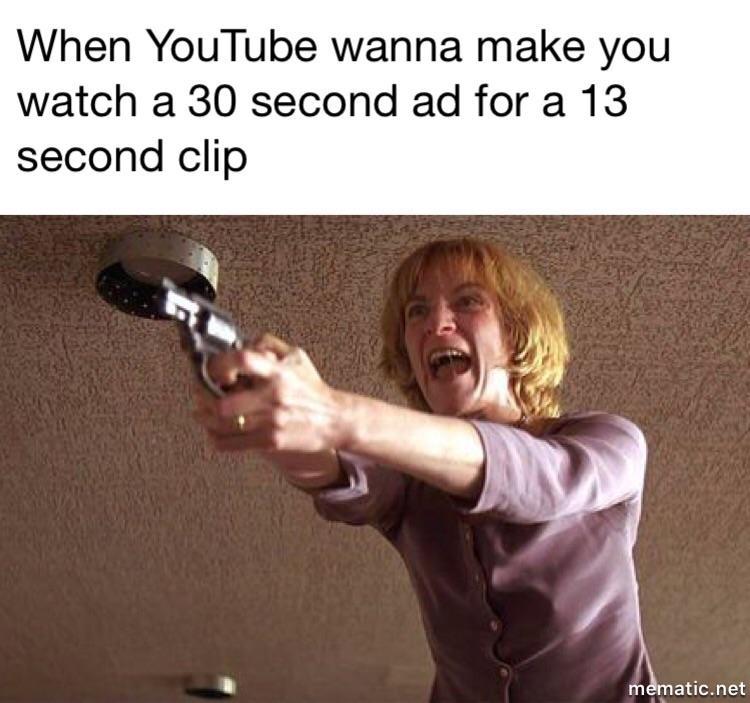
Meme about Youtube Ads

Not the most liked form, but it comes in multiple form

  1. The most obvious one is YouTube format but do you remember that there were time when it was a single ad skippable in 5 second or so, unlike now when 15-20 second unskippable double ads on YouTube that we are force to watch. 
  2. This is where a short ad is displayed in the middle of the media consumption like TikTok ads, IG story ads, Fb reels ads and so forth. Short being the key.
  3. Non advertising content, this is done by iplayer and Netflix. In these ads the content is pointing to another piece of content on the platform that may be to the user’s liking based on their cookie data and machine learning algorithms. So what happens is that iplayer before playing your intended content plays a preview or trailer for another content which you can skip YouTube style. Netflix on the other hand has created ‘fast laughs’ feature which is linked to the content library of Netflix that user can link to their playlist.

Some video platform advertisers with outside sponsors offer premium subscriptions, where the user will be spared all forms of advertising. A good example being YouTube Premium. 

Similarly is the case for YouTube’s music streaming services YouTube music with YouTube music premium, which only reflective of other music streaming services such as Spotify with its Spotify premium and SoundCloud with their SoundCloud Go.

Another way to go about it is what Disney plus intends, as Disney+ will soon be available at a reduced price, but you’ll have to sit through commercials. The Walt Disney Company has said that it would introduce an ad-supported version of its Disney+ streaming service in the United States late this year, with plans to roll it out overseas in 2023.

Moving on to the fourth category of ads on the virtual world.

  1. In game advertising, more specifically mobile gaming, most free games that are offered up on app stores tend to show ads. I touched on my last blog on Beatstar, that there are two routes that developers tend to go down:
    1. The user is forced to watch watch ads in order to continue to play games whether that’s in between levels or re attempts. They tend to use ads after three consecutive non interrupted events.
    2. This is when developers worked in a model where the user needs not to see a single ad to play the game. The ads are offered up to the user as a supplementary action to gain some purchasing power in the game (e.g. coins or currency) or to upgrade in some way. This is the case with Beatstar by SpaceApe and War Robots by Pixonic.

This is a more laid back approach or should I say revenue model. Which I am sure the users appreciate. Bringing in seven figure income for Beatstar in one month on App Store alone (see blog) through premium game purchase and in game purchases bought with real money. Which I feel is the real victory.

This second model gradually trains users to collect currency in a scarce manner and makes them ever more careful when spending them. Which I feel may not prove to be in the best interest for both parties.

The game ads vary, some more interactive than others, some rely on celebrity endorsements, some on the creative engaging content and some even offering up financial incentives. Some game ads do not distinguish the audiences resulting in children looking at 18+ content such as gambling.

To conclude ads are here to stay and who knows how they will work the world of Web 3.

Mo! Out!

Modern Day gaming

Previously I’ve blogged on many headings regarding gaming. Like how developers can program in advanced algorithms to keep users glued to the game for hours. How grade A ad-free games are being offered by Netflix to retain existing customer base. How memory challenges are overcome by game developers.

Today, I want to touch on what interesting things devs are up to in the modern day gaming. How they are employing the ‘Lollapalooza effect‘ to get gamers to play their game. Lollapalooza meaning keep adding to the mix factors until failure is impossible.

Confusing right? I will explain in the context of my latest craze.

Enter BeatStar 🎉

It is a very simple game, a little more interactive than Guitar hero (for those of us who can remember).

Before I mention what the Dev’s have employed. I should mention some problems or as devs like to call it ‘challenges’😁 that the present mobile gaming face:

  1. Loading time puts users off but any decent game requires this, memory challenge. Loading time in between levels people get bored.
  2. Repetitive seeing the same animations for winning, bonus, prizes, upon completion and thus becoming board. 
  3. User forced into a linear progression. Consecutive levels. Giving very little freedom.
  4. Ads – most great games are free but they force the user to watch ads . The user has no choice in this. Forcing to watch 18+ ads of gambling and worse (one word ‘nanny affair’). Which in the case of kids Forcing the parents to delete it out right.
  5. Another app to add to the Home Screen
  6. No sense of connection with a community. With exception of the occasional league board or share on SM account.
  7. If a player advances the levels too quickly it puts them off the game, if the player cannot complete 50% after several attempts, it puts them off the game.

So how do folks of SpaceApe attempt to address the above, I have written the response in corresponding numbers :

  1. There is only one progress bar animation (you know this 👉 🟩🟩🟩🟩🟩⬜⬜⬜⬜⬜⬜⬜⬜ 40%) which is at the beginning of the game.
  2. A user can skip the repetitive charade of animations by simply tapping on the screen several times.
  3. The user cannot reattempt a level by pausing the gameplay, there is no option for it. The user has choice of music genres, difficulty levels and Ranks to toggle in between.
  4. Ads are completely optional. The user can download and play the game without seeing a single mandatory ad. If the user wants to earn some in-game purchasing power, they can view ads on their own accord to earn a few diamonds and cards.
  5. Sadly there is no solution to this apart from making a great app that people want to house on their home screen 😁
  6. This game has numerous ways beyond the boilerplate to create better sense of community. Like for instance creating a league of your own with your network of work colleagues and friends.
  7. Algorithms aside, there are four degrees to complete a level, five star, gold, platinum and beat master.

Other factors at play are:

  • Wonderfully satisfying click sound that is made whilst navigating the menus
  • The crisp music quality
  • The carefully curated choice of licensed songs for the game.
  • The limited plays per day for free version, leaving all the freeloaders wanting more. As unlimited daily dwell time can sometimes have the opposite effect, users may treat the game as a vice. 

To conclude I believe Gary V once said ‘nostalgia is a lucrative business’ something of this is at play here, where not only Spaceape are cashing in on great musical success of the artists but also the tried and tested UX of guitar hero but only for unfamiliar audiences like gen Z.

No wonder they have half a million downloads on the Playstore and a blog post about the game over on Android central. It is currently ranked #1 for music app on the app store, with a million+ downloads and over $2m in in-game purchase revenue in the last month alone (stats ref). All this since the launch on 15th of November 2021.

Mo! Out!

Ticktok craze

So my blog titled ‘By any means – TikToking, mobile gaming‘ discussed how Netflix jumped on the quick to watch portrait style medium named ‘fast laughs’. There is also ‘reels’ in IG doing the same thing. Well, enter Youtube Doing the same (they call it ‘shorts’), in the same way as described (i.e. sharing, format, length and UX).

Youtube shorts

But that’s not what this blog going to address, rather the idea of it. Why has the world gone mad for this style content creation, What is going on this platform and perhaps ‘what lies beneath all this’.

Let’s start with the big Why?:

Answer: I don’t know 😁. I have no clue why short span portrait orientation style videos are on the up 📈 (in terms of consumption)1. It is not like we did’t have short span video before (like in IG stories, snapchat, WhatsApp status and YouTube stories). Maybe it is another miracle given to us by UXDs, something to do with ’swipe up to skip next’. I don’t know.

Next question, What sort of stuff is on Tiktok. Over the past few weeks I have been surfing ticktok. I found content curated for me included ‘quick to learn iOS 15 iPhone settings tricks’, ‘game dev’s secrets to keep users engaged’, ‘ticktok trend alerts’, ‘online money making tricks’, ‘psychology’, ‘jaw dropping facts of nature’, ’star gazing’, ‘marketing tricks’, ‘free resources’, ‘app development’, ‘skill share’, ‘shower thoughts’, ‘live streams of street buskers’ and just generally a lot of ‘humorous takes on people, life and the world’. Most content is very fast talking and has ‘jump cut’ applied to it (interns of editing).

FOMO is a big part of this platform’s appeal. You can’t see your watch history2, so unless you save the video, probably you can never find it again. Something they probably borrowed from snap chat’s disappearing feed and further improved the concept.

The content curation (or the clips que) is down to an algorithm and limited to single clip at a time. Rarely did I find myself using the search feature or to go the explore tabs. The platform is very wise as to apply the retail principle of ‘dynamic assortment’ to user’s viewing feed.

Moving on, In terms of fakes and clickbaits, I found ticktok too has its fair share of this. I found content where false claims are made out to be true. Thankfully the platform’s reporting feature is very quick to apply, putting the clip under review straight away.

The platform has a billion users watching content creators perform, entertain, share, give tips, see others succeed whilst others at the same time; lie, spread false information and make false claims. 

But lets talk longevity of this knowledge, most of the information consumed is quick and small sound bytes, which makes me wonder how much does it really help when looking back in a month’s time, looking back bi annually and looking back annually.

Mo! Out!  


  1. Setting aside other popular features that have lead to the success of Ticktok like dance duet-ing trends and paying live performers with gift icons 🎁.
  2. There is a long winded way, where you end up requesting your data packet from Tiktok and then read the data file.

E-commerce platforms and dropshipping simplified

High top sneakers with General Assembly logo


As you may know I wrote a post about entering the world of e-commerce platforms, this post is just a one further step from that. I wanted to clarify to anyone how easy it is to be able to set up and connect the two.

So here is a video of screen walkthrough of how to set up dropshipping on existing platform.

Video expounding on how to set up dropshipping step by step

I go through how to decide on retail mark-ups, how to outsource product designs, how to speed up SHOW page loading time when using mock-ups, how to have an automated dropshipping process in place, how to source media, how to set up variable SKUs (e.g. shoe size) and so forth.

In the process of scripting, recording and editing the video I have spent far too much time ⌚️, I am hoping it will be of some benefit for anyone waking up one morning and designing a shoe (😁 like me in this instance).

Design your own shoe dropshipping menu

Still, as much as I love to make a blanket statement claim like ‘this video covers the entirety of everything there is know about dropshipping’ or ‘this is an easy means of a passive income for anyone’ I am afraid I can’t. There are way too many things that I have left unaddressed (such as postal times, product curation, supplier selection, types of dropshipping and so forth).

Furthermore, I wouldn’t recommend to anyone to dwell for long on making a success out of this, as you can see in this (almost confession like) video of this Youtuber, explaining the intricacies of dropshipping further and how he made just shy of $500 for six months of labour for this cause. Thankfully expounding on many things that is not covered in the scope of this blog (like marketing campaigns and customer correspondence)

Extremely tired 🥱 Mo! Out!

By any means – TikToking, mobile gaming.

By any means – TikToking, mobile gaming.

What on earth am I on about you wonder.

As I mentioned in a LinkedIn post last week (see post). The big tech firm Apple is integrating features which proved successful (or engaging) during the imposed Covid lockdown.
Namely:

  • Zoom’s link sending feature – which allowed non app users to log on through a URL and complete the chat.
  • Zoom’s screen share feature
  • Spotify’s Group sessions feature – which allowed multiple logged on members to listen to the same track at the same time. Providing they all have Spotify premium

Apple’s IoS 15.1 release has now all of the above listed features and more. Differing only in name, which are in-line with Apple’s naming convention.

So all of that aside, Enter Netflix. Yes, Netflix too has decided to integrate successfully proven features into its app’s eco system. Namely mobile gaming and tiktoking.

First mobile gaming.
Here is a what they have put out on their website under the heading ‘Let the games begin’. So, Netflix has commissioned a Veteran game developer to create series of mobile games which are available on App store and Playstore but can only be played by those with a Netflix subscription (i.e. a Netflix auth login is required on the game).

The games themselves are beyond the scope of this blog post but it should be said that although they are only a handful in numbers, they are as good as they come. Each one being a love child of all the successful mobile games (like angry birds, temple run and candy crush) over the past decade, drawing on what worked in each one to maximise attention span or dwell time and emulngamating it into one game. Having played them for hours on end myself over the passing week 😁, I can confirm it worked. Whether it was the brightly coloured clean & chic animations or the well proven incentives within the games, it worked.

To add icing on top 🎂, all the games are completely ad-free, available off line and available in different languages.

The games are only available to all the Adult profiles and not available for Netflix’s children profiles. A policy I respect.

Next, Tick-Toking

Staying on the topic of user attention span or dwell time. TickTok as you may already know is ‘a video-focused social networking service. It hosts a variety of short-form user videos, from genres like pranks, stunts, tricks, jokes, dance, and entertainment with durations from 15 seconds to three minutes.’ (👈 copied from Wikipedia). This platform went from 500million users to over a billion (see source) over the course of 2020-2021. So, what does Netflix do,

Introducing Fast Laughs:

Youtube video by Netflix explaining Fast Laughs feature


Yes, as you can see same swipe up model, around 30 seconds (or so) clips from snipped from Netflix’s colossal library of owned content. The user can save and share them (on Whatsapp, Instagram, Snapchat and Twitter). Clips start playing and when one ends another begins, just like Tiktok 😁.

Netflix goes further. Fast Laughs lets you add series, films and stand-up specials to your list, or start viewing them immediately.

Which I would have been surprised if they didn’t do.

Mo! Out!

Stepping into the world of e-commerce store

E-commerce store

Over the course of a year I have been pushed into a life of managing e-commerce stores (one after another) and I feel it is time I shed some light about this.

Brief timeline:

  1. Last year I became a web developer managing client side communications for a retailer. This involved bridging the communication gap between a retailer and developers working to complete a Megento 2 store overseas. This forced me to learn about the how the world of e-commerce platforms work. How they are (a bit like this very WordPress blog) able to allow web developers to code websites and offer site-builders (drag and drop, upload logo and choose template) to those who can’t. These e-commerce platforms have whole eco-systems from which you can upload products onto your store (as easy adding an another line to excel sheet) and insert the SEO content (all in the one form). All with fairly well UX but the user competency levels can vary (and you can dedicate hours and hours on udemy to learn to use specific platforms).

    I left this place of work three months later.
  2. After the above work place ended I went into talks with business owner to set up and commission build for our own e-commerce platform. I learned a lot from this time (see LinkedIn article – Starting a Start-up) but all the effort did not bear fruit in the conventional way. The business never backed the business plan however (during my research) I ended up learning about Square‘s e-commerce platform (not to be confused with Squarspace) see footnote.
  3. Next came the line of requests from local businesses to start-ups. Asking if I can set them up to trade online and connect squares marketing tools to their social media handles (so they can purchase ad packets from the social media platforms).


Back to the subject at hand, what are the learnings:

As a dev I am in an advantages place in comparison to others who may have come from data entry professions.

For example:

  • I can integrate the CSS in line with business brand guidelines by any time jumping into the code editor in squares dashboard and amending the necessary code.
  • I can embed Facebook pixel (knowing what it is and why it is required) to track ad campaigns.
  • I can connect google analytics to business’s web store. In fact I ran a google ad campaign, from which we (the business and I) knew very well what works and what didn’t.
  • I can talk to square’s helpline (if the website is glitching) and am able to communicate the exact issue.

In conclusion, the whole roller coaster was well worth the effort and subsequently the work I received.

Footnote on Square: For those who do not know, Square is the most coolest thing I’ve come across. It is an American financial services and digital payments company based in San Francisco with subsidiaries (including WeeblySquare AU Pty LtdSquare Capital, LLCMORE). Square allows anyone to build a e-commerce store coded or drag’n’drop style free of charge (no monthly or annual fees), all they ask is 1.9% for every transaction. They even give you a store domain with a .square suffix.

The Square Dashboard gives you real-time sales data. Compare sales week to week, year to year or any period. Other tools include: creating and managing product subscription services, Respond to private customer feedback, Create and edit custom discounts to offer customers, create and manage coupon code, manage what features which staff can access, create & send invoices, and inventory/stock management .

Mo! Out!

Digital literacy and Google’s new OS

Ever wondered if the tech world is moving too fast and making a lot of user assumptions on behalf of the people.

Ever wondered how those varying in degrees of digital literacy will manage new OS release by Google.

Some themes explored in this blog post

Digital literacy and Google’s new OS


I’ve been trying to find time to write this blog for some time, Stay with me it is still about (the overarching theme of the blog) development.

Today I want to tackle the subject of digital literacy (or the lack of it). So, just so we are on the same page about being technically literate. Technically literate implies having some competency in searching, navigating and locating information in digital environments and after finding your information you can evaluate, analyse and apply your critical thinking skills to found information.

And of-course there are levels to being digitally literate. Take me for example, being a developer, I can easily navigate mac OS Big Sur, also known as mac OS 11.

On the other hand, I met a man the other day (at the bus terminal) and he needed help in completing the simple task of just paying for a ticket from the machine, he could not navigate the payment machine’s digital interface. Thankfully, assistance on this instance, I was able to give.

But recently (even me!), being a developer and being able to operate a mac using commands in the terminal, was not able to move files around in my iCloud storage. I ended up deleting my files from local disk, just because I wanted to delete some files from the cloud. It happens to all of us, where we face unfamiliar digital territory and end up lost.

Some of this is down to UX. I’ve alluded to this in the past many times over. Also in the past, in the blackberry blog post I iterated “that a software or web app needs to have less of launch event show off features and more of building loyal customer base features (that genuinely removes non-value-adding things and process from a user’s life) by training them over longer period of time“.

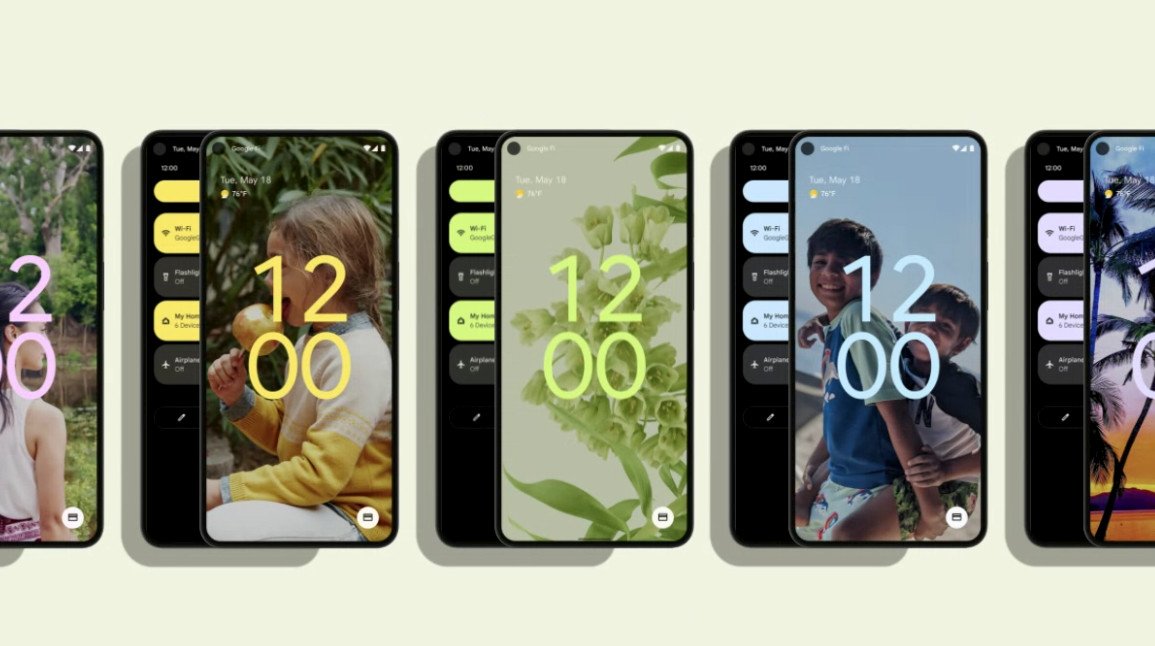
So, UX and longevity user training, but back to the subject at hand. Google (in the past few months) has released Android 12 (a OS for devices running android). It is visual overhaul. Don’t believe me, check this out!

This is what the quick settings menu looks like.

Android 12 quick settings menu

Yes, as you can see a redesign with (huge buttons, new controls like payment & smart home controls & google wallet, toggle buttons for mic and camera access, one button for cell and wifi).

In addition to this there are fresh customisation and privacy capabilities. Examples include:

  • Automatic theme-ing system (pulling colour schemes from your wallpaper and applying that theme with those colours to the rest of the system).
  • Refresh of the widget system with completely new design widgets.
  • Car unlock
  • Android TV remote
  • New on the screen indicators for use of mic and camera (i.e. like battery percentage you will know when mic and camera are in use).
  • A privacy dashboard (showing you a ring pie chart of when and which app accesses your location, map, camera and microphone) like we see for cpu usage and screen time.
  • Nearby Share feature – for Wifi passwords (lets you quickly share your WiFi network details with people in the same room as you by a simple scan of a QR code)

All fantastic stuff, However I do wonder how will those with low levels of digital literacy cope.

Mo! Out!

E-learning and where are we heading

E-Learning

As we have now left the lockdown here in the U.K., It made me wonder how teaching and learning was affected by this period. We had some cool things happen like schools ‘cancelling the exams’ to vest power into a ‘algorithm’ to determine the grades, but what else can we learn from this period, especially in regards to e-learning.

I’ve said this in my previous blog posts and still to some extent I practice ‘hand written notes’. May be it is the millennial in me, but nowadays things are so facilitating that students need not to even lift a pen. Take this Buzzfeed video for instance:

In this video you find students sharing keyboard shortcuts that require very little effort on the students part to pass through life of e-learning. Like if you hold down command⌘ + Shift + 5 during an online lecture your mac will type up notes verbatim of the tutor. Or another hack I liked was that due to accessibility standard of Youtube most video are available in written format, thus you can download the transcript and hold down command⌘ + F to locate the exact point of information you need (not needing to watch the whole thing).

And that’s just two examples, there is so much more in the video.

I do wonder how much these learning hacks are of benefits and of harm for the students. How much of the knowledge is absorbed and at what rate at it is absorbed.

Mo! Out!

Design a site like this with WordPress.com
Get started